

AI TRAINING FOR TEAMS
Build an AI-native team across every role.
Practical AI skills for the work each person actually does.
01 / CHOOSE A ROLE
Different jobs need different training.
Start with one role on your team.
Marketing
Turn campaign briefs into source-backed content, tested creative assets, and checked reports before your team uses them.
See the course02 / TRY IT YOURSELF
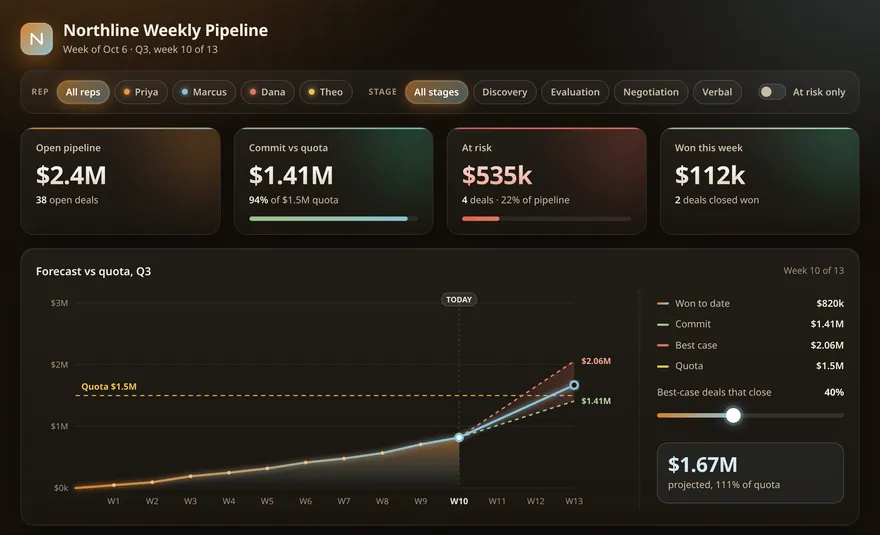
Turn a slide into something useful.
Use AI to turn a sales deck into an interactive page. Try the first lesson free.
Weekly pipeline · Q3, week 10
Fictional company. Real lesson. Sample data.
Try the free lessonIn your browser. No login needed.
03 / BRING THE TEAM
Build the habit, then build on it.
- 01
Pick a role
Choose a course around the work your team owns.
- 02
Make time to practice
Practice giving clear instructions, checking the output, and fixing what’s wrong.
- 03
Put it to work
Review what people can do, then bring in the next role.
For teams of 8–12 · Courses by role
Turn a dead slide deck into a page your team runs the week from.
Help more people become the person who knows how.
When AI questions always go to the same colleague, the rest of the team needs a way to learn. People need time to practice, examples that fit their jobs, and a way to judge whether the results are useful.
PromptDojo gives each role a place to start and a sequence of lessons to work through. The goal is for more people to use AI, check their work, and explain what they did.
- Practice giving AI context before it writes, including asking it to interview you about the task.
- Studio lessons use the work each role already owns: campaign calendars with named approvers for marketers, cleaning logs and traceable memos for analysts, SOPs and approval lines for ops.
- Choose a course for each role, then review the work people produce.
- Practice questioning AI outputs and checking their supporting evidence.
Practice for three different roles
- marketing specialistMarketing
Campaign studio: one campaign, end to end, with the gate on
- The content operating system: position to learning
- The voice pack is data
- Batch plan and calendar
3 of 45 lessons - data analystData Analyst
Analytics studio
- The cleaning log
- Every number has an address
- Challenge the recommendation, then rerun the memo
3 of 61 lessons - operations specialistOperations
Ops studio
- The SOP is data
- Auto-run or named approval
- Numbers with receipts: every figure in the ops report traces back to the export
3 of 67 lessons
Different jobs. Training that fits each one.
A marketing specialist and an HR specialist have different responsibilities. Choose the course closest to each person’s job. They’ll learn shared foundations, then practice tasks and review methods relevant to their role.
Marketing & creative
Turn campaign briefs into source-backed content, tested creative assets, and checked reports before your team uses them.
Create assets from a brief and brand kit. Check consistency and prepare the work for handoff.
Draft copy in your brand’s voice, check factual claims, and prepare versions for editorial review.
Operations & delivery
Customer support
Engineering & data
People & legal
Start with one team. Build from what they learn.
Start with a group that shares a responsibility or recurring task. Choose the course that best matches their work.
Work through browser-based lessons and exercises. Learn to direct AI, inspect its output, and fix mistakes.
Look at what people can explain and demonstrate. Discuss what still needs checking before it can be used at work.
Use what the first group learns to plan the next course and the time people need to practice.
Where could your team use AI more effectively?
Start with the work you want to improve. We’ll discuss the team, the roles involved, and a suitable training scope.